

Updated February 21, 2023

Definition of Bitbucket Branch Permissions
The bitbucket data center can configure branch permissions to have server control access on repository branches. The branch permissions are configured based on groups or users with few restrictions. These are ensured after the project and repository level permissions that inhibit deleting a branch or unauthorized pushing but don’t work on branch creation. The permissions of the branch are completely based on the update given to the tags and existing branches. The prefix can be edited for all types of branches other than production and development branches. This article discusses the types and permissions configured to the branches in bitbucket in detail.
Bitbucket branch permissions overview
The branching permissions are configured in the data center of bitbucket to imply the branching workflow on the deployment process of git. The user can create a branch from the JIRA software, or it can be created directly from bitbucket. The branch type and name should be based on the application; these values can be changed anytime if required. The user should provide the repository name, the branch type, the branch from the point initiated from the tag or branch, and the branch name. Here the prefix should be based on the selected branch type and branching model.
Using bitbucket branch permissions
The branch permissions should depend on groups and users with actual restrictions ensured after the project deployment and the permissions provided at the repository level. It prevents the accidental deleting of the branch and unauthorized pushing. The permissions are imposed on updates to tags and existing branches. The user can include branch permissions in all project repositories, or it can also be configured to any individual repository. The user can configure multiple branch permissions for any repository or project. When giving the branch permission, the user should mention the branching pattern, branch name, branching model, and how to impose the permission. Users can create exceptions for explicit users, access keys, and groups when creating branch permissions or editing.

To configure branch permissions for all repositories:
The user should have an admin role to give all such permissions.
- Navigate to project settings, select branch permissions
- Then choose to add permissions.
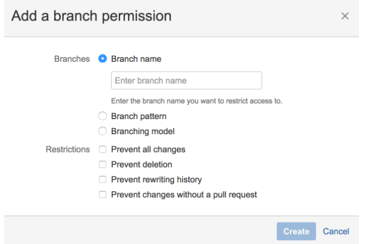
- In the restrictions area, give the type of actions to inhibit and add an exception for any selected users or groups.
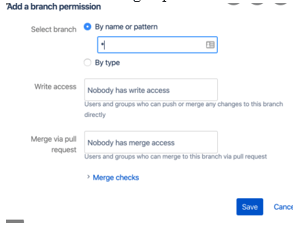
- In the branches column, choose the permission of the branch by clicking on the branching model, branching pattern, or branch name.
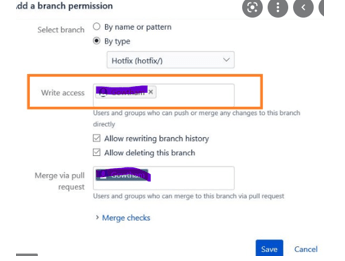
- Adding a group or user or access key as an exception means that the restriction will not get applied to them
Branch types and overlapping
Using Bitbucket, the user can use branching models to configure the branch workflow on repositories. When the workflow is mapped with a branching model, the administrator can collaborate with team members to name the branches by editing the branch type to become available. Few available branches have default naming prefixes, and users can follow their naming convention for every branch type. The related naming conventions help to identify the branch and its type. Bitbucket has several types of branches which are explained below,
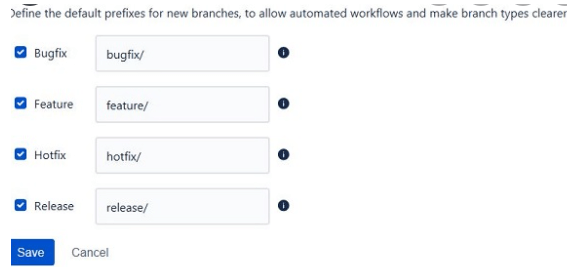
- Development branch – It is the integration branch used for feature work and the named branch or default branch. The workflow in the pull request is the branch with new features.
- Production branch – It is used for deployment, and this can be initiated or merged back to the development branch. Finally, the git-based workflow is used to make it available for a production release.
- Feature branch– It is used for improvement work and specialized featured work. It can be initiated or merged back to the development branch according to the pull request.
- Release branch – It is used for long-term maintenance versions, which are used to release tasks. It is also initiated or merged back to the development branch, and it can also be merged to its earlier release branch, which is configured automatically. Finally, the recent release branch can be merged with the development branch.
- Bugfix branch – It is used to fix the bugs in the release branches.
- Hotfix branch – It is used for a quick fix of the production branch without affecting the changes in the development branch. The configuration changes are merged into development and production branches in the workflow.
Creating bitbucket branch permissions
The branching permission for the entire project has the chance to inherit a similar branching model or repository. There are multiple ways to give branch permission, including branch permission to the repository or project. The user can configure the permissions available from the branch permission dialog.
Branch field options – in each branch permission, the user should apply the permission to the individual branches by choosing the branching model, pattern, and branch name.
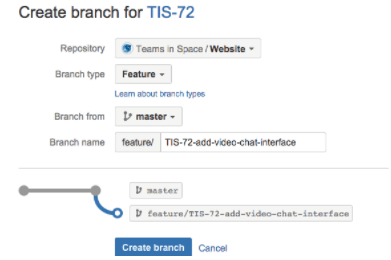
In the branch name field, enter the name of the existing branch where the permission needs to be applied or to restrict access. It can also use to restrict access to an individual branch.
The branch pattern field follows the syntax to choose the matching branches.
Branching models are used to choose the type of branches to limit access to multiple branches.
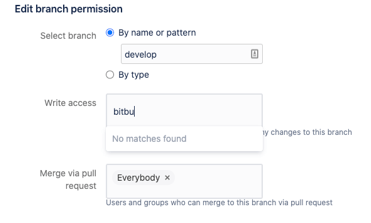
In the restriction field, the user can choose the branch permission, which implies actions to abide by and configure exceptions to limited resources.
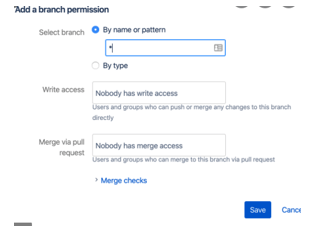
- Prevent all changes – it is used to push the concerned branch and restrict it from creating new branches that have the same pattern or branch.
- Prevent deletion – it prevents accidental tag and branch deletion.
- Prevent rewriting history – it prevents the history from being overridden by a concerned branch. For example, it is done by a rebase or force push.
- Prevent config changes without any pull request – it stops the pushing directly to the concerned branches, where the changes are enabled with a pull request.
Conclusion
Hence, the permission to the branches, types of branches, and restrictions applied in branches are explained in detail. These are simple configurations made in the branching workflow of bitbucket to avoid unauthorized access.
Recommended Articles
This is a guide to Bitbucket Branch Permissions. Here we discuss the definition, overview, Using bitbucket branch permissions, and Examples with code implementation. You may also have a look at the following articles to learn more –
